Ever sign into apps like Airbnb or Candy Crush via the blue "Log in with Facebook" button? It's an easy alternative to the tedium of creating an account by typing in a userID and password, and since you're likely already signed into Facebook's app, you'll have quick access to other apps in just a couple of taps.
The caveat for the convenience has always been agreeing to hand over a collection of your personal information to those apps when you log in through Facebook, such as your birthday and email address. In fact, you had to agree to share whatever the app asked for, or else you wouldn't be granted access.
But a few months ago Facebook quietly redesigned its app login experience so users could edit which type of personal information they want to share with third-party apps (i.e. you may be okay with sharing your Facebook Likes, but not your email address).
This is a subtle yet big change that puts more control back into the hands of users, and it's something not everyone knows about. Considering 80% of both iOS and Android apps offer a "Log in with Facebook" option, with varying degrees of access to personal information, it's worth understanding how the feature works.
How it works
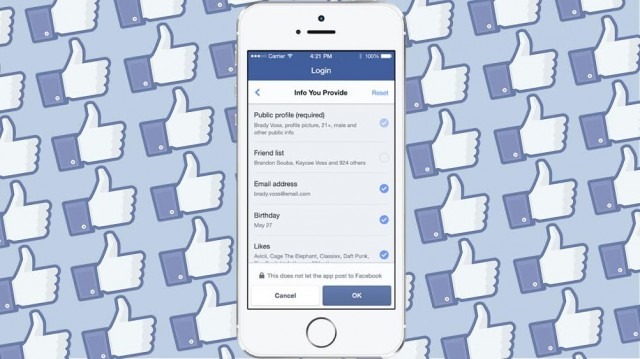
After an app asks if you want to log in via Facebook, you'll see a screen that reveals what personal information will be shared. Before the change, the permissions screen gave you only one choice: approve or cancel. But now there's a prominent option to edit your info; you can see the change in the picture below.
By tapping "edit," you'll see a screen that breaks down the shared info in bullet points. In this example, it includes your friends list, birthday, email address, Facebook Likes and phone number. From here, you can de-select specific items.
There's also a choice to prevent an app from posting information to Facebook without asking permission first — we assume most people will want to select this option — but if you're cool with an app posting things for you (like your high score on Candy Crush), you can select who sees those updates (public, friends, only me and so on).
While Facebook aims to make its platform a bit more transparent about where your information is going, it's a good reminder to routinely check and see which apps are connected to your Facebook account. If you haven't played a certain game or accessed an app in awhile, you should probably disconnect it to better protect both your security and your privacy.
If you ever want to review of change permissions in your Facebook-connected apps, you can view the full list under you App Settings in Facebook, either on the web or in the app.
Fuente: mashable.com